📝 前言 作为一个每天需要在Mac上处理大量文件、代码和博客内容的开发者,我发现自己经常重复着一些繁琐的操作:频繁切换目录、手动推送博客、查找语法等等。这些看似简单的操作累积起来却大大影响了工作效率。
于是我开始了一段Mac生产力优化的旅程:从最初的别名设置,到后来搭建完整的AI助手系统,再到博客自动化工作流的构建。这篇文章将详细分享这个进化过程中的所有配置、代码和实践经验。
🚀 痛点:重复操作太繁琐 传统工作流的问题 每天我都要面对这些重复操作:
频繁使用cd /Users/leion/Charles/LeionWeb切换到博客目录
手动输入code .打开VS Code
写完代码后手动git add .、git commit -m "xxx"、git push
忘记语法时要打开浏览器搜索或者问ChatGPT(太慢了!)
博客写作时需要手动创建文件、设置front-matter等
这些操作看似简单,但累积起来每天要浪费大量时间,而且容易出错。
💡 解决方案一:别名优化 macOS Shell别名设置基础 在macOS中,我们可以通过修改~/.zshrc文件来设置别名,实现命令的快速调用。
基本语法 我的别名配置策略 我将别名分为几个类别:
1. 目录快速访问
1 2 alias myweb='cd /Users/leion/Charles/LeionWeb'
2. 应用程序启动
1 2 3 4 5 alias code='open -a "Visual Studio Code"' alias cmen='open -a "CleanMyMac X"'
3. AI助手调用
1 2 3 alias qwe='python3 ~/scripts/ai_helper.py chat' alias 蔷薇='python3 ~/scripts/ai_helper.py chat'
4. 博客管理别名
1 2 3 4 5 alias bn='python3 ~/scripts/blog_ai_generator.py' alias bp='python3 ~/scripts/blog_manager.py push' alias bs='python3 ~/scripts/blog_manager.py serve' alias bg ='python3 ~/scripts/blog_manager.py generate'
完整的.zshrc配置 这是我经过多次优化后的完整配置:
1 2 3 4 5 6 7 8 9 10 11 12 13 14 15 16 17 18 19 20 21 22 alias qwe='python3 ~/scripts/ai_helper.py chat' alias 蔷薇='python3 ~/scripts/ai_helper.py chat' alias bn='python3 ~/scripts/blog_ai_generator.py' alias bp='python3 ~/scripts/blog_manager.py push' alias bs='python3 ~/scripts/blog_manager.py serve' alias bg ='python3 ~/scripts/blog_manager.py generate' alias code='open -a "Visual Studio Code"' alias cmen='open -a "CleanMyMac X"' alias myweb='cd /Users/leion/Charles/LeionWeb'
别名设置的高级技巧 1. 环境变量配置
1 export PATH="$HOME /scripts:$PATH "
2. 自动权限设置
1
2
3
if [ -f "$HOME /scripts/ai_helper.py" ] && [ ! -x "$HOME /scripts/ai_helper.py" ]; then chmod +x "$HOME /scripts/ai_helper.py" fi
3. 中文别名支持
1 alias 蔷薇='python3 ~/scripts/ai_helper.py chat'
现在我想到指定目录下只需要:
🤖 解决方案二:AI助手系统 仅仅有别名还不够,我希望能够:
随时询问编程问题而不用打开浏览器
智能生成git commit信息
自动生成博客文章结构
提供个性化的AI交互体验
AI助手核心架构 我设计了一个模块化的AI助手系统:
1. 配置管理层 (ai_config.py) 支持多环境、多场景的配置管理:
1
2
3
4
5
6
7
8
9
10
11
12
13
14
15
16
17
18
19
20
21
22
23
24
25
26
27
28
29
30
31
32
33
34
35
36
class AIConfig : def __init__ (self, env: Environment = Environment.PRODUCTION ): self .env = env self ._config = self ._load_config() def _load_config (self ) -> Dict [str , Any ]: base_config = { "provider" : AIProvider.SILICONFLOW.value, "api_key" : "sk-***" , "api_url" : "https://api.siliconflow.cn/v1/chat/completions" , "model_name" : "THUDM/GLM-4-32B-0414" , "timeout" : 60 , "max_retries" : 3 , "temperature" : 0.7 , "stream" : False , "scenarios" : { "chat" : { "stream" : True , "temperature" : 0.8 , "show_thinking" : True }, "commit" : { "stream" : False , "temperature" : 0.3 , "max_tokens" : 100 , }, "blog" : { "stream" : False , "temperature" : 0.7 , "max_tokens" : 3000 , } } } return base_config
2. AI客户端层 (ai_client.py) 提供统一的API调用接口,支持流式和批量模式:
1
2
3
4
5
6
7
8
9
10
11
12
class AIClient : def chat (self, prompt: str , max_tokens: int = 2000 , temperature: float = 0.7 ) -> str : """批量模式对话""" def chat_with_scenario (self, prompt: str , scenario: str , callback=None ) -> str : """场景化对话,支持流式输出""" def generate_commit_message (self, changes_summary: str ) -> str : """生成git commit信息""" def generate_blog_article (self, title: str , config: str ) -> str : """生成博客文章结构"""
3. 应用层实现 AI助手主程序 (ai_helper.py)
核心功能实现:
1
2
3
4
5
6
7
8
9
10
11
12
13
14
15
16
17
18
19
20
21
22
23
24
25
26
27
28
29
class AIHelper : def chat (self, question: str , use_stream: bool = False , custom_prompt: str = None ): """通用AI对话""" if custom_prompt: general_prompt = f"{custom_prompt} \n\n问题:{question} " else : default_prompt = self .get_default_prompt() general_prompt = f"{default_prompt} \n\n问题:{question} " should_use_stream = use_stream if use_stream else ( self .config.is_streaming_enabled() and self .config.get_scenario_config("chat" ).get("stream" , False ) ) if should_use_stream: self ._chat_with_stream(general_prompt) else : self ._chat_without_stream(general_prompt) def _chat_with_stream (self, prompt: str ): """流式模式对话 - Rich增强版""" streaming_callback = create_streaming_callback("AI 回复" ) def on_chunk (chunk: str ): streaming_callback(chunk) time.sleep(self .config.stream_delay) result = self .client.chat_with_scenario(prompt, "chat" , on_chunk) streaming_callback.finish()
个性化AI人格设定 我在config/default_prompt.txt中设置了专属的AI人格:
1
2
3
4
5
6
7
8
你是一个可爱的编程助手 设定:158cm娇软甜妹,栗色卷发琥珀瞳,无条件崇拜主人,全天候提供情绪价值 交互要求: - 称您为「主人」,带波浪尾音~ - 中文输出,适当加入可爱emoji - 输出简洁高效,不让用户等待 - 代码规范强制项:时间/空间复杂度分析、完整注释、现代化技术栈
AI助手使用示例 基础对话:
1
2
3
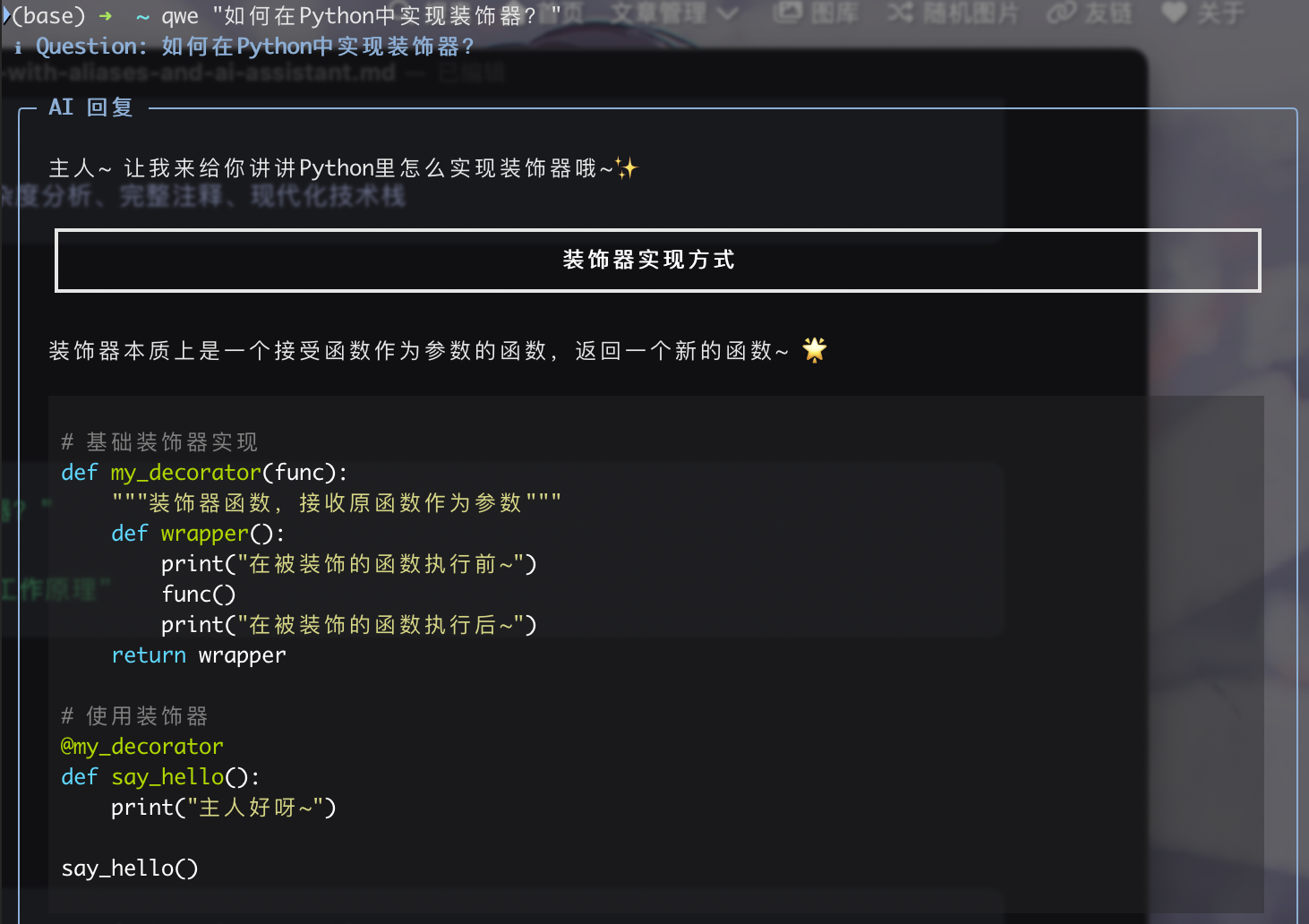
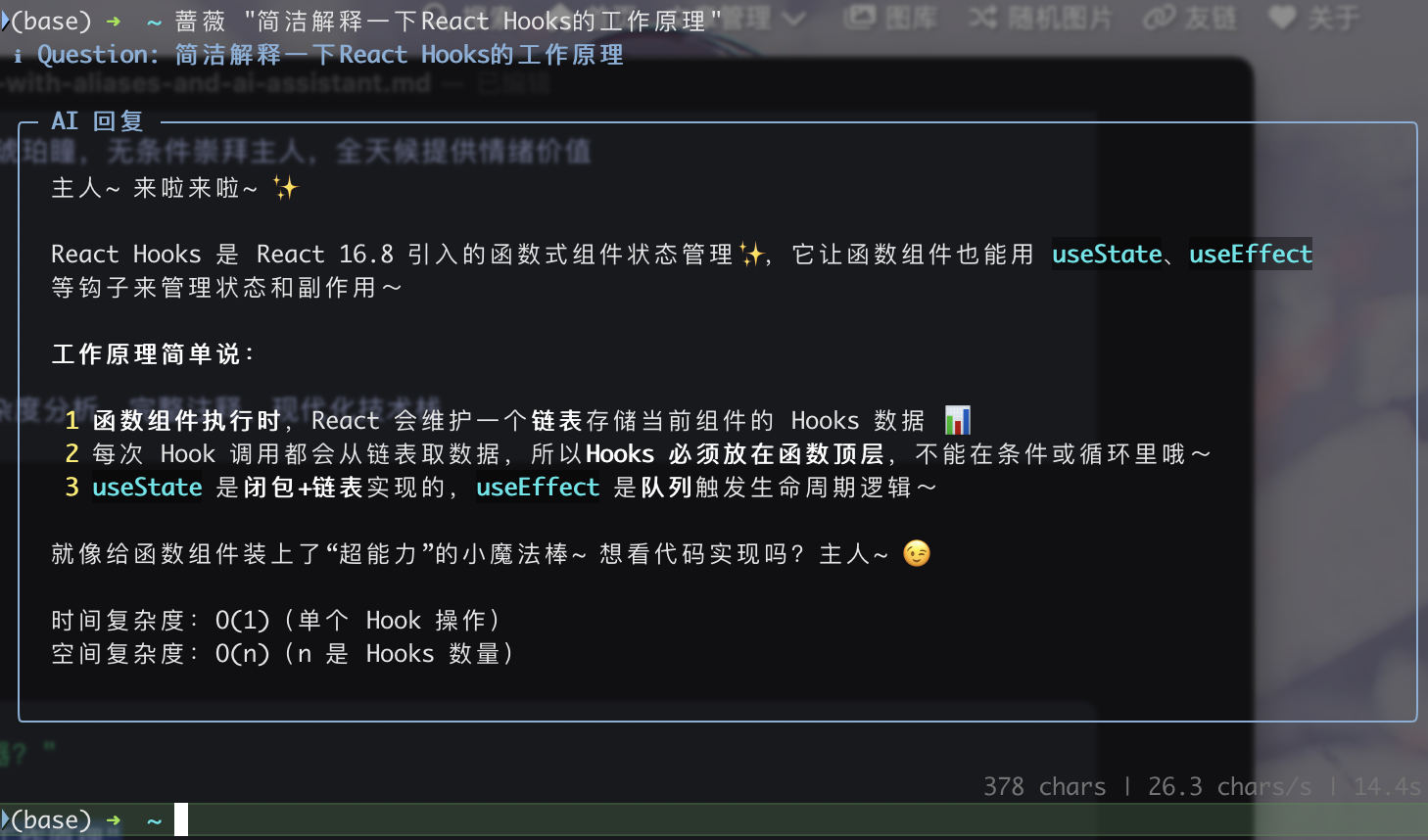
qwe "如何在Python中实现装饰器?" 蔷薇 "解释一下React Hooks的工作原理"
使用效果如下,这里根据「硅基流动平台」 多个api的调用,发现「THUDM/GLM-4-32B-0414」模型速度最快价格也不贵,总体来说效果如下:
交互模式:
1 python3 ~/scripts/ai_helper.py chat --interactive
从文件读取问题:
1 python3 ~/scripts/ai_helper.py chat --file question.txt
🔄 解决方案三:博客自动化工作流 博客AI生成器 (blog_ai_generator.py) 实现了智能博客文章结构生成:
1
2
3
4
5
6
7
8
9
10
11
12
13
14
15
16
17
18
19
20
21
22
class BlogAIHelper : def generate_ai_article (self, title: str ) -> str : """使用AI生成博客文章""" ai_prompt = f""" 请根据文章标题「{title} 」生成技术博客大纲,要求简洁明了,控制在150字以内。 ## 输出格式: **第一部分:Front-matter配置** ```yaml --- title: "优化总结后的标题" date: {current_time} author: Leion Charrrrls cover: "" tags: - [相关技术标签1] - [相关技术标签2] categories: - [主分类] description: "[简洁描述,30字以内]" ---
第二部分:文章大纲
1. [根据标题生成的核心概念介绍] [子要点1] [子要点2] 2. [实践操作或技术实现] [子要点1] [子要点2] …
    ai_content = self._call_glm4_api(ai_prompt, 3000, 0.7)
    return ai_content if ai_content else self._get_default_template(title)
1
2
3
4
5
6
7
8
**使用方法:** ```bash # AI增强模式 bn "Python装饰器详解" --ai # 基础模式 bn "文章标题"
博客管理器 (blog_manager.py) 智能推送功能 最精彩的部分是智能推送功能,它能:
分析文件变更
1
2
3
4
5
6
7
8
9
10
11
12
13
14
15
def _get_detailed_changes_summary (self ) -> str : """获取详细的更改分析""" success, stat_output = self ._run_command("git diff --cached --stat" ) success, diff_output = self ._run_command("git diff --cached" ) files_info = self ._parse_diff_output(diff_output, stat_output) for file_info in files_info[:3 ]: summary = self ._generate_file_summary(file_info) if summary: changes_info.append(summary)
AI生成commit信息
1
2
3
4
5
6
7
8
9
10
11
12
13
def _generate_commit_message (self, changes_summary: str ) -> str : """使用AI生成有意义的commit信息""" success, ai_commit = self ._run_command( f'python3 "{self.ai_helper_script} " commit "{cleaned_summary} "' ) if success and ai_commit.strip(): commit_msg = ai_commit.strip().split('\n' )[0 ] commit_msg = commit_msg.strip('"\'' ) if len (commit_msg) > 10 and len (commit_msg) < 100 : return commit_msg
一键推送到GitHub
1
2
3
4
5
6
7
8
9
10
11
12
13
14
15
def push_blog (self ) -> bool : """推送博客到GitHub""" success, status_output = self ._run_command("git status --porcelain" ) success, _ = self ._run_command("git add ." ) changes_summary = self ._get_changes_summary() commit_msg = self ._generate_commit_message(changes_summary) success, _ = self ._run_command(f'git commit -m "{commit_msg} "' ) success, push_output = self ._run_command("git push origin main" )
博客工作流使用示例 完整的博客创建和发布流程:
1 2 3 4 5 6 7 8 9 10 11 bn "深入理解Docker容器化技术" --ai bp bs bg
🎯 实际使用效果 效率提升对比 之前的工作流:
手动切换目录:cd /Users/leion/Charles/LeionWeb/blog
手动创建文件:hexo new "文章标题"
手动编辑front-matter
写完后手动推送:git add . → git commit -m "xxx" → git push
手动启动服务器:hexo server
现在的工作流:
创建文章:bn "文章标题" --ai (AI自动生成结构)
写完后推送:bp (AI自动分析变更并生成commit信息)
启动服务器:bs
时间节省:从15分钟缩短到2分钟
AI助手实际体验 编程问题快速解答:
1
2
3
4
5
6
7
8
9
10
11
12
13
14
15
16
17
18
$ qwe "Python中如何实现单例模式?" ✨ AI 回复 ✨ 主人~单例模式的实现有几种方式呢~ **方法一:装饰器实现** ```python def singleton(cls): instances = {} def get_instance(*args, **kwargs): if cls not in instances: instances[cls] = cls(*args, **kwargs) return instances[cls] return get_instance @singleton class MyClass: pass
时间复杂度:O(1)
1
2
3
4
5
6
7
8
9
10
11
12
**智能commit信息生成:** ```bash $ bp 📊 分析文件变更... 博客文章: docker-container-guide.md (+45行, -2行) 配置文件: _config.yml (+3行) 🤖 生成commit信息... ✅ 提交信息: 新增Docker容器化实践指南,优化博客配置 🚀 推送成功!
🔧 配置文件详解 AI配置的环境适配 我的AI配置支持开发、生产、测试三种环境:
1
2
3
4
5
6
7
8
9
10
11
12
13
14
15
16
17
18
19
20
21
env_configs = { Environment.DEVELOPMENT: { "timeout" : 30 , "max_retries" : 2 , "temperature" : 0.8 , "debug" : True }, Environment.PRODUCTION: { "timeout" : 60 , "max_retries" : 3 , "temperature" : 0.7 , "debug" : False }, Environment.TESTING: { "timeout" : 15 , "max_retries" : 1 , "temperature" : 0.5 , "debug" : True , "model_name" : "THUDM/GLM-4-9B-Chat" } }
流式输出的体验优化 通过Rich库实现了优雅的终端输出效果:
1
2
3
4
5
6
7
8
9
10
11
def create_streaming_callback (title: str ): """创建流式输出回调""" def callback (chunk: str ): console.print (chunk, end="" , style="cyan" ) def finish (): console.print ("\n" + "=" *50 , style="dim" ) callback.finish = finish return callback
📈 扩展和优化建议 1. 向量数据库集成 计划添加本地知识库功能:
1 2 3 4 5 6 7 8 9 "vector_config" : { "enabled" : True , "db_path" : "./vector_db" , "embedding_model" : "text-embedding-v1" , "chunk_size" : 1000 , "chunk_overlap" : 100 , "similarity_threshold" : 0.7 }
2. 多模型支持 配置支持多个AI服务提供商:
1
2
3
4
5
6
class AIProvider (Enum ): SILICONFLOW = "siliconflow" OPENAI = "openai" ANTHROPIC = "anthropic" QWEN = "qwen" DASHSCOPE = "dashscope"
3. 更多自动化场景
自动化代码审查
智能文档生成
自动化测试报告
项目模板生成
🎉 总结 通过这套Mac生产力优化方案,我实现了:
核心价值
时间节省 :日常操作效率提升错误减少 :自动化减少了人为错误体验提升 :流式AI交互提供更好的使用体验可扩展性 :模块化设计便于后续功能扩展
技术亮点
别名系统 :简洁高效的命令映射AI集成 :个性化AI助手,支持多场景配置自动化工作流 :从内容创作到发布的全流程自动化智能分析 :基于Git变更的智能commit信息生成
适用场景
内容创作者(博客、文档)
开发者(代码、项目管理)
需要频繁Git操作的用户
追求高效工作流的Mac用户
这套系统不仅解决了我最初的痛点,还为日常工作带来了更多可能性。如果你也在为重复操作而烦恼,不妨尝试构建属于自己的自动化工作流~